
Follow these directions for formatting and submitting your essay.
Insert running header
- Click “Insert” and scroll down; click “Header.”
- Change the alignment to “right align”
- Type your proper last name
- Hit the space bar
- Insert the page number by clicking “Insert” then “Page number” then the top left box. (do not type the number!)
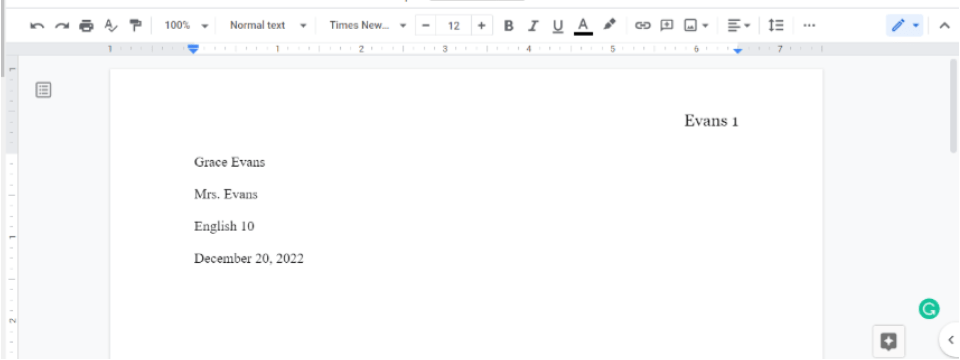
- See below for an example
- Click on the white space below the header to return to the regular document.

Insert MLA Header
- At the top of the page, type your formal first and last name and push Enter
- Type your teacher’s name: Mrs. Evans (be sure you type this correctly!). Push enter.
- Type the course: English 10. Push enter.
- Type the due date of the paper: December 15, 2022. Type it using the format in the example. Push enter.
Create a title
- Change the alignment to center align
- Type the title as shown: Characterization: Luis Cintron
- Push enter. Change alignment to left aligned for the new line
Copy and paste your first paragraph in
- Copy your introduction and paste it in.
- Copy and paste in your thesis right after the introduction. Be sure there’s a space after the period.
- Return to the first line of the paragraph and push TAB just once.
- Return to the very end of the paragraph and push Enter. The new line should be indented automatically for you.
Copy and paste your other paragraphs in
- Paste your entire first paragraph in.
- Push Enter.
- If the first line does not automatically indent, click at the beginning of the paragraph and push TAB once. If it did indent, skip this step.
- Be sure there are no line breaks between sections of the paragraph.
- Repeat this for all of the supporting paragraphs.
Double-check formatting
- Be sure that each paragraph has just ONE indention. If it doesn’t add it. DO NOT USE THE SPACE BAR TO INDENT!
- Be sure that each paragraph only has ONE indention. If it has more than one, reduce it down to one.
- Be sure the entire essay is double-spaced. To do this, highlight the entire essay and select “Format” and then “Line & Paragraph Spacing” and then “Double.” DO NOT USE THE ENTER BUTTON TO DOUBLE-SPACE THIS ESSAY!
- Be sure there are no blank lines in the essay. If you push Enter more than once between the paragraphs or before/after the title, you will lose points. Remove extra line breaks if they are present.
- Be sure all of the text is in Times New Roman, size 12. Do this by selecting all of the text and changing the font type and size. Make sure no text is in bold or italics. If you need help with this, see Mrs. Evans.
Turn in your essay!
If you are in class, you may bring your essay to Mrs. Evans before submitting it to get a free look-over. Otherwise, turn in the essay and celebrate your victory!